Wikicode for Beginners
Jump to navigation
Jump to search
| Help & Contribute (Edit) | ||||||||||||||||||||||||||||||||||||||||||||||||||||||||||||||||||||||||||||||||||||||||||||||||||
|---|---|---|---|---|---|---|---|---|---|---|---|---|---|---|---|---|---|---|---|---|---|---|---|---|---|---|---|---|---|---|---|---|---|---|---|---|---|---|---|---|---|---|---|---|---|---|---|---|---|---|---|---|---|---|---|---|---|---|---|---|---|---|---|---|---|---|---|---|---|---|---|---|---|---|---|---|---|---|---|---|---|---|---|---|---|---|---|---|---|---|---|---|---|---|---|---|---|---|
| Before You Start | Editor's Creed - Wikicode for Beginners - How to use Templates | |||||||||||||||||||||||||||||||||||||||||||||||||||||||||||||||||||||||||||||||||||||||||||||||||
| Existing Entries | Advice on what sort of content should go under each heading - Style Guide | |||||||||||||||||||||||||||||||||||||||||||||||||||||||||||||||||||||||||||||||||||||||||||||||||
| Create new templates | Create a new weapon or model ability - Create a new Spell template | |||||||||||||||||||||||||||||||||||||||||||||||||||||||||||||||||||||||||||||||||||||||||||||||||
| Setting up new articles | New models - Weapon templates | |||||||||||||||||||||||||||||||||||||||||||||||||||||||||||||||||||||||||||||||||||||||||||||||||
| Other | Report a Bug - Request a Feature | |||||||||||||||||||||||||||||||||||||||||||||||||||||||||||||||||||||||||||||||||||||||||||||||||
This is only a basic run through of wikicode. I have no desire to go through every advanced feature, since it's all documented on the "real" wikipedia anyway. If you do want to learn more advance techniques, I suggest you try exploring what's available on this website.
Page formatting
| What you want to do | The code to do it | What it looks like | Comments |
|---|---|---|---|
| Headers | Use equals signs. The more signs, the lower the heading.
=Level 1 header= ==Level 2 header== ===Level 3 header=== ====Level 4 header==== |
Level 1 headerLevel 2 headerLevel 3 headerLevel 4 header |
Generally 3 levels are enough. If you feel the need to subdivide your article into smaller and smaller chunks, I'd suggest that you need to re-think how you're organising your article because you're no longer communicating effectively. |
| Bold Text | 3 apostrophes
This is '''bold''' text. |
This is bold text. | |
| Italic Text | 2 apostrophes
This is ''italic'' text. |
This is italic text. | You can combine bold and italic with 5 apostrophes |
| Underlined Text | Use of quasi-html code <u> and </u>
This is <u>underlined</u> text. |
This is underlined text. | |
| Bulleted list | Use asterisks. The more asterisks, the more indents.
* This is one indent. * This is also one indent. ** This has two indents *** This has three ** Back to two |
| |
| Numbered list | Use hash. The more hash, the more indents.
# This is one indent. # This is also one indent. ## This has two indents ### This has three ## Back to two |
| |
| Combined list | Use a mix of hash and asterisks.
# This is numbered list with bullets
#* aaa
#* bbb
* This is bulleted list with numbers *# ccc *# ddd * This is gibberish #* eee *# fff |
|
Links
| What you want to do | The code to do it | What it looks like | Comments |
|---|---|---|---|
| Link to an article | Use square brackets, [
[[Commander Coleman Stryker]] |
Commander Coleman Stryker | |
| Link to an article, and rename the link | Use square brackets, [, and separate with a pipe |
[[Commander Coleman Stryker|Styker1]] |
Stryker1 | Pipes can be found on your keyboard between the backspace and the enter keys. |
Categories
| What you want to do | The code to do it | What it looks like | Comments |
|---|---|---|---|
| Add a page to a category | Just write it in kind of like a normal link[[Category:Help]] |
Nothing will appear in the example, because categories are listed at the bottom of the page instead. | |
| Link to a category | Use a colon before the category.
[[:Category:Help]] |
Category:Help | |
| Link to a category and rename it | Use a colon and pipe
[[:Category:Help|Click here for help]] |
Click here for help |
Templates
Main article: How to use Templates
| What you want to do | The code to do it | What it looks like | Comments |
|---|---|---|---|
| Add a template into a page | Use curvy brackets, {
{{Undead}}
|
 Undead Undead
|
|
| Link to a template | Use a colon before the template.
[[:Template:Undead]] |
Template:Undead | |
| Link to a category and rename it | Use a colon and pipe
[[:Template:Undead|Zombies]] |
Zombies |
Images
Main article: Mediawiki
| What you want to do | The code to do it | What it looks like | Comments |
|---|---|---|---|
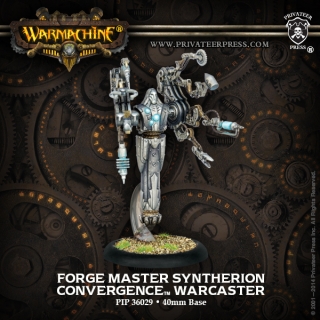
| Insert an image | Write it in kind of like a link:
[[File:ForgeMasterSyntherion WEB.jpg]] |
| |
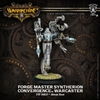
| Resize an image to a specific pixel size | Use a pipe and ###px
[[File:ForgeMasterSyntherion WEB.jpg|100px]] |
| |
| "Float" an image on the right of text | Use a pipe and the word right
First paragraph [[File:ForgeMasterSyntherion WEB.jpg|right|100px]] Second paragraph |
First paragraph
Second paragraph |
Note that the top of the image will be aligned with whatever the previous line of code is doing. In this case, the top of the text of "First paragraph" lines up with the top of the image. |
| Image with a caption | Turn it into a thumb, then put the text in with a pipe
[[File:ForgeMasterSyntherion WEB.jpg|thumb|Caption text here|200px]] |
Be careful this doesn't interfere with other images/tables on the page. You can end up with boxes jumping all over the place. |