101 - Terrain Rules
| 101 Articles (Edit) |
|---|
| Models
Gameplay Attacks & Actions
Battlegroup Other
|
| LPG Articles (Intermediate) |
| LOTS Articles (Advanced) |
- This article is part of Warmachine University's Crash Course (101) series, which is "Basic Training" aimed at new players who are still learning the core rules.
- The 101 series is intended to help you understand the rulebook, but you shouldn't be reading this instead of the rulebook.
This article covers the terrain core rules. The next article, Terrain List, is a reference guide for all the "default" terrain types.
Introduction
First off you should note that terrain is divided into two types:
- Terrain that models can't end their movement in/on (obstacles and obstructions)
- Examples: Fences, walls, & buildings
- To gain a bonus from this sort of terrain, your model needs to be behind it and near it (this is covered further in 101 - Concealment & Cover).
- Terrain that they can (everything else).
- Examples: Rubble, forests, water
- To gain a bonus from this sort of terrain, your model needs to be completely within it.
Personally I like to call (1) "Object terrain" because players will often use physical objects for it, and I call (2) "Area terrain" because players will often use a flat piece of cut-out to represent the extent of that area; any physical scenery on the cut-out are more "representative" than literal - if they get in your way, you move them.
Beyond those two types, to use a piece of terrain you need to define these 7 attributes. The rest of this article will detail these 7 attributes.
- Dimensions
- Placement restrictions
- LOS effects
- Movement Penalty Type
- Concealment / Cover / Neither
- Obstacle / Obstruction / Neither
- Terrain Special Rules
- Forest
- Shallow Water
- Dense Fog (Cloud)
- Rubble
- Trench
- Acid Pool
- Burning Earth
Some attributes are automatically linked, for instance a forest is always (2 - unrestricted ; 3 - blocks LOS as per forest rules ; 4 - rough terrain ; 5 - concealment ; 6 - is not an obstacle/obstruction ; 7 - is a forest)
Overlapping Terrain
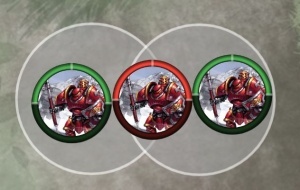
The red Man-O-War is not completely within either cloud, so he does not benefit at all (even though the clouds are overlapping).
Before we get into the terrain rules proper, let's go over what happens when terrain overlaps. This shouldn't happen often because when you set up a table no terrain should be overlapping. There are even minimum spacing requirements (covered below in #Placement Restrictions).
However many models can summon new clouds, forests, and water which may lead to them overlapping. When this happens:
- If you get a benefit from being completely within an area, such as a cloud, then the model needs to be completely within a single area. See example diagram.
- If two different terrain types overlap, you apply all the terrain rules to the overlapped area. For instance say you have a cloud placed over a forest, and then you have a model that ignores clouds for LOS; that model would not be able to ignore the overlapped forest for LOS.
Attributes
Dimensions
- Length and Width
- All terrain has at a minimum a length and width. For simplicity, two dimensional terrain is usually understood to encompass the entirety of the tile or mat placed on the table, regardless of the picture on the terrain piece. Most terrain pieces are between three to six inches in length and width.
- Height
- Obstructions and Obstacles have height. Height determines the difference between an obstacle and obstruction. Most obstructions, like buildings, are assumed to be greater than five inches in height.
- Diameter (circular)
- Some terrain may be circular, and be expressed in terms of diameter. Many cloudlike terrain pieces will be expressed as a three, four, or five inch Area of Effect (AOE). It's also possible to have circular obstructions and obstacles.
Placement Restrictions
The core rules do not restrict where terrain can be placed on the table. Terrain placement restrictions are usually determined in the league packet, tournament packet, or narrative campaign being played. It is possible for terrain to be placed densely, sparingly, balanced for competitive play, or unbalanced for a casual or narrative play.
- Tournament Packets - Steamroller / Brawlmachine
- No terrain can be placed within 6" of any table edge.
- Restricted Terrain (hazards, obstructions, obstacles) cannot be placed within a deployment zone, or within 5" of another Restricted Terrain piece.
- Unrestricted Terrain (everything else) cannot be placed within 2" of any other terrain piece, unless it's a trench. Trenches can overlap.
- Additionally, there are 3 methods of spreading out terrain. 2 of these methods require a LOS-blocking piece of terrain to be touching the centre of the table.
- Narrative Packets
- Oblivion Campaign - has special terrain placement rules for each scenario. It also includes unique interactive terrain pieces that cause effects in-game.
- Winter Rampage 2020 - two pieces must be placed in each quadrant of the table, and cannot be within 3" of each other.
- Summer Rampage 2020 - several restrictions, the main one being that all terrain pieces cannot be placed within 3" of each other.
LOS Effects
Terrain can affect line of sight (LOS) in many different ways:
- Obstacles and Obstructions
- Obstacles do not block LOS
- Obstructions block LOS based on true line-of-sight and abstract base-volume, but it is often house ruled to block LOS the same way models do. See LPG - Vertical LOS for more info.
- Clouds
- You can see everything within the cloud, no matter how thick the cloud is or how little of the target is inside the cloud.
- You can not see through a cloud, except...
- ... Clouds never block LOS to a huge-based model.
- If multiple clouds overlap, then you have to treat each one individually.
- Forests
- You can see partially through a forest. You can see up to 3" into or out of the forest.
- You can not see through a forest, except...
- ... Forests never block LOS to a huge-based model.
Movement Penalty Type
- Obstacles
- Obstacles block charges, slams, and tramples. They do not block other movement (walking or running).
- Obstacles are ignored by models with Pathfinder.
- Obstructions
- Obstructions are difficult terrain (see below).
- (1) Open terrain
- No penalty
- (2) Rough terrain
- Models move at half speed (unless they have something like Pathfinder).
- (3) Difficult terrain
- (4) Impassable terrain
- Models can never move through this terrain. Not even if they're ghosts.
- Most game tables do not have any Impassable terrain. It's reserved more for cinematic / narrative tables.

|
Tip ! |
Cover / Concealment
Most terrain will give either concealment (+2 DEF) or cover (+4 DEF) vs ranged attacks and magic attacks. Obstacles and obstructions will give a flat +2 DEF vs melee attacks.
The cover and concealment DEF bonus do not stack. If you somehow benefit from both, you just take the higher value.
Cover and concealment are not interchangeable terms - for instance Prowl triggers if a model has concealment, but it won't if they have cover.
Area terrain will typically give you cover/concealment as soon as you are fully within that area, but getting cover/concealment from obstacles/obstructions is a little more complicated - refer to 101 - Concealment & Cover.
Obstacles / Obstructions
- Obstacles
- Examples - Hedges, small walls/ruined walls, small pile of crates
- Obstacles are smaller than 1" tall. You can walk/run over them normally, but they completely block charges and slams (unless you have Pathfinder etc).
- Obstructions
- Examples - Buildings, tall walls, gigantic boulders
- Obstructions are larger than 1" tall, and they are difficult terrain so they block normal movement. Pathfinder doesn't work on obstructions, unlike obstacles, but stuff like Flight still works.
Both obstacles and obstructions will give a defender +2 DEF vs melee attacks, and will give either cover or concealment vs ranged attacks and magic attacks.
You cannot stop your movement on top of obstacles or obstructions.
If a model is slammed or thrown into either an obstacle or obstruction, you get to add an extra d6 to the damage roll.
Lastly, the term linear obstacle is an obsolete term from the mk2 rules. Some players including myself still use it to describe walls, fences, etc.
Terrain Special Rules
Forest
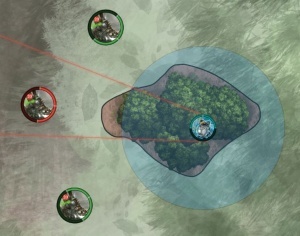
The two green Deathrippers can see the Servitor because there is less than 3" between the forest edge and the Servitor, from where they're looking.
The red Deathripper has more than 3" of forest to look through, so cannot draw LOS to the Servitor.
Forests are rough terrain that grant concealment to models completely within the forest.
Forest interfere with LOS as follows:
- A model can see 3" into a forest or 3" out of a forest, but never all the way through (even if the forest is less than 3" wide).
- So a forest blocks LOS to everything behind the forest, except...
- Forests do not block LOS to huge-based models.
Shallow Water
- Rough terrain
- Does not block LOS
- Does not grant cover nor concealment
Dense Fog
Dense Fog is open terrain that is a Cloud effect. Players often just refer to Dense Fog as a cloud.
- See Category: Cloud for details.
At the start of mk3 there was a rule for Dense Fog randomly evaporating at the start of a player's turn, but this rule has since been taken out of the game.
Rubble
- Rough terrain
- Does not block LOS
- Gives cover to models completely within the rubble.
Trench
Trenches are 3" x 5" rectangles that you may place touching each other to form trench networks.
- Open terrain
- Do not block LOS. Also, models completely within a trench do not block LOS either.
- Grants cover to models completely within the trench.
- Grants immunity to blast damage to models completely within the trench, unless the centre of the AOE lands within the trench.
- Although it grants blast damage immunity, it does not stop a continuous effect from being applied.
- You can have trenches larger than 3" x 5", and in other shapes than a rectangle. Defining the trench dimensions was necessary for trench templates to exist in the game. The official Privateer Press trench templates that come in packages along with the Trencher Blockhouse are intended to be used in its entirety (Infernal Ruling).
Acid Pool Hazard
You can add "Acid Pool Hazard" to any piece of terrain. Doing so means:
- It makes the terrain piece Shallow Water (as above) in addition to its other types.
- Models without Flight that enter an Acid Pool suffer the Continuous corrosion effect.
- A model with Flight that is knocked down in an Acid Pool suffers the Continuous corrosion effect.
Acid Hazard
Players will sometimes add "Acid" to a piece of terrain, instead of calling it Acid Pool. For instance they might call something an Acid Cloud or Acid Forest.
Doing so means:
-
It makes the terrain piece Shallow Water (as above) in addition to its other types. - Models without Flight that enter an Acid [thing] suffer the Continuous corrosion effect.
- A model with Flight that is knocked down in an Acid [thing] suffers the Continuous corrosion effect.
Burning Earth Hazard
Burning Earth can be applied to other terrain pieces (such as a burning forest or a burning oil slick on water) or they can be a standalone terrain piece.
- Burning Earth is a Cloud Effect (see Category: Cloud for details).
- Models without Flight that enter or end their activation in Burning Earth suffer the Continuous fire effect.
- A model with Flight that is knocked down in a Burning Earth suffers the Continuous fire effect.
Burning Earth can randomly go out. At the end of each player's turn, except for the first player's first turn, roll a d6 for each Burning Earth. On a 1 or a 2 the flames go out; it is no longer a cloud and no longer applies Continuous fire.
- In the Steamroller 2019 packet, players do not roll to see if the Burning Earth randomly disappears. It stays in place the whole game.
Lastly if you apply "Burning Earth" to another terrain piece, and a model has some way to make clouds expire, and they manage to make the cloud expire ... the entire terrain piece disappears. For example if you have a burning forest, building, or lake, and hit it with a "clouds expire" effect, then the forest, building, or lake disappears. It seems odd to me, because they could have just ruled that the terrain piece loses the cloud effect or burning earth template, but that's the way the official ruling went (Infernal Ruling).