101 - Terrain
| 101 Articles (Edit) |
|---|
| Models
Gameplay Attacks & Actions
Battlegroup Other |
| LPG Articles (Intermediate) |
| LOTS Articles (Advanced) |
- This article is part of Warmachine University's Crash Course (101) series, which is "Basic Training" aimed at new players who are still learning the core rules.
- The 101 series is intended to help you understand the rulebook, but you shouldn't be reading this instead of the rulebook.
This article covers the terrain core rules. The next article, Terrain List, is a reference guide for all the "default" terrain types.
Introduction
Unofficially terrain can be divided into two types:
- Terrain that models can't end their movement in or on (obstacles and obstructions)
- Examples: Fences, walls, & buildings
- To gain a bonus from this sort of terrain, your model needs to be behind it and near it.
- Terrain that they can end their movement in (everything else).
- Examples: Rubble, forests, water
- To gain a bonus from this sort of terrain, your model needs to be completely within it.
Overlapping Terrain
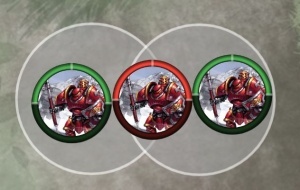
The red Man-O-War is not completely within either cloud, so he does not benefit at all (even though the clouds are overlapping).
At the start of a game no terrain will be overlapping (refer to #Placement Restrictions) however it can occur when models summon new clouds, forests, water etc. When this happens:
- If you get a benefit from being completely within an area, such as a cloud, then the model needs to be completely within a single area. See example diagram.
- If two different terrain types overlap, you apply all the terrain rules to the overlapped area. For instance say you have a cloud placed over a forest, and then you have a model that ignores clouds for LOS; that model would not be able to ignore the overlapped forest for LOS.
Terrain Rules - Core
Clouds
|
From the 2021.08 edition of the core rules. (Update text) |
|
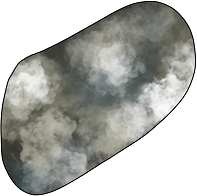
Dense Fog (pg 87) Patches of dense fog or thick smoke limit visibility on the battlefield. Dense fog is represented by clusters of 3˝, 4˝, or 5˝ AOE templates. These templates are cloud effects (p. 60). Cloud Effects (pg 60) A cloud effect produces an area of dense smoke, magical darkness, thick mists, or the like that remains in play for a specified length of time. Use an AOE template of the appropriate diameter to represent the cloud. Every model with any part of its base covered by the cloud’s template is within the cloud and is susceptible to its effects. In addition to being affected by a cloud’s special rules, a model completely within the perimeter a cloud effect gains concealment (p. 49). The cloud effect does not block line of sight from models within it to those outside of it or from models outside it to models within it, but it completely obstructs line of sight from models outside of it to anything beyond it. Thus, a model can see into or out of a cloud effect but not through one. A cloud effect provides no protection from melee attacks. Cloud effects do not block line of sight to huge-based models. | |
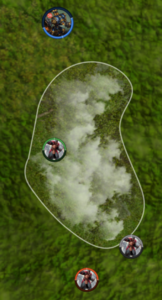
LOS - Unlike Forests, clouds don't have a 3" limit to LOS. If even a tiny bit of your base is inside the cloud, other models can see you from any direction. But if you are completely behind the cloud you can't be seen at all. So the "back edge" of a cloud blocks LOS to everything (except huge-based models).
Buffs & Penalities - Clouds provide concealment to models completely within a single cloud effect. If there are two clouds partially overlapping, and a model is standing such that it is fully within both clouds but not fully within either cloud, it does not get concealment.
If the cloud has any sort of penalty (such as Caustic Mist) then you suffer the penalty as soon as you are a tiny bit in it.
Super Clouds - When setting up a table, Cloud terrain can be "upgraded" to Fire Clouds (as per Burning Earth), Acid Clouds (as per Acid Bath but no water), or Squall.
- See also: Category: Cloud
Forests
|
From the 2021.08 edition of the core rules. (Update text) |
|
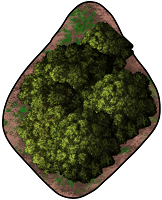
Forests (pg 87) A forest is generally considered to be a wooded area that is not so dense that models cannot move through it, but these rules can be applied to any terrain feature that hinders movement and makes a model inside it difficult to see. A forest is rough terrain and provides concealment (p. 49) to a model completely inside its perimeter. When drawing line of sight to or from a point within a forest, the line of sight can pass through up to 3˝ of forest without being blocked; anything more blocks it. When a model outside a forest attempts to draw line of sight to another point also outside that forest, the forest blocks line of sight to anything beyond it. Thus, a model can see 3˝ into or out of a forest but not completely through one regardless of how thick it is. Forests do not block line of sight to huge-based models. | |
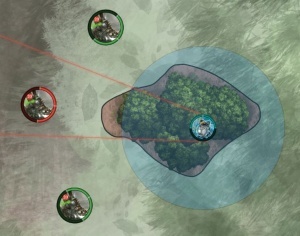
The two green Deathrippers can see the Servitor because there is less than 3" between the forest edge and the Servitor, from where they're looking.
The red Deathripper has more than 3" of forest to look through, so cannot draw LOS to the Servitor.
LOS - A model can see 3" into a forest or 3" out of a forest, but never all the way through (even if the forest is less than 3" wide). So larger forests can block LOS to things inside them, and all forests block LOS to things behind them (except huge-based models).
Buffs & Penalities - Forests provide concealment to models completely within a single forest. If there are two forests partially overlapping, and a model is standing such that it is fully within both forest but not fully within either forest then it does not get concealment. The only penalty a normal forest has is that it is rough terrain.
Rough terrain - Models move at half-speed as soon as any part of their base overlaps a forest, and they don't stop moving at half speed until they are all the way out.
Super Forests - When setting up a table, Forest terrain can be "upgraded" to Burning Forest (as per Burning Earth), Acid Forest (as per Acid Bath but no water), Acid Marsh (as per Acid Bath and with water), or Windswept.
- See also: Category: Forest
Rubble
|
From the 2021.08 edition of the core rules. (Update text) |
|
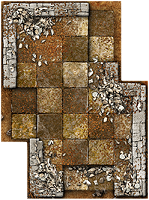
Rubble (pg 87) Rubble represents large areas of ruined ground that provide ample opportunities for cover but are challenging to traverse, such as collapsed structures and impact craters. Rubble is rough terrain and provides cover (p. 49) to a model completely inside its perimeter. | |
LOS - Rubble does not block LOS.
Buffs & Penalities - Rubble provide cover to models completely within it.
The only penalty normal rubble has is that it is rough terrain.
Rough terrain - Models move at half-speed as soon as any part of their base overlaps rubble, and they don't stop moving at half speed until they are all the way out.
Super Rubble - When setting up a table, Rubble terrain can be "upgraded" to Burning Rubble (as per Burning Earth), Corrosive Rubble (as per Acid Bath but no water), or Windswept.
- See also: Category: Rubble
Shallow Water
|
From the 2021.08 edition of the core rules. (Update text) |
|
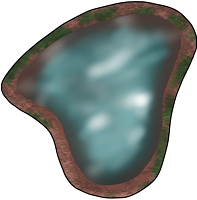
Shallow Water (pg 87) Shallow water is rough terrain. | |
That's right, it has no special rules except for being rough terrain; it lets some models use their own Amphibious rule but that's about it.
Side-note: Deep Water was removed from the game in 2016, when mk3 was launched.
Rough terrain - Models move at half-speed as soon as any part of their base overlaps water, and they don't stop moving at half speed until they are all the way out.
Super Water - When setting up a table, Shallow Water terrain can be "upgraded" to Burning Oil (as per Burning Earth), Acid Bath, or Windswept.
- See also: Category: Shallow water
Other
Placeholder
Terrain Rules - Steamroller
Placeholder
Setting out terrain
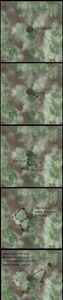
- The core rules don't place any limitations on where you place terrain.
- However the Steamroller supplement does (technically SR is just for tournaments, but most players follow its rules for every game - we talk about it more in the Intermediate series).
- There are also narrative campaigns, and some fan-made tournament packets (such as Clashmachine), which limit terrain placement.
The SR packet defines things as follows:
- General
- Terrain cannot be placed within 6" of any table edge
- Terrain cannot be placed within 2" of any other terrain (except trenches; they can be placed next to other trenches)
- The table should have at least two LOS-blocking pieces
- Ignore the core rule about fog/fire/etc randomly expiring
- Restricted terrain
- Crater, hazards, obstructions, obstacles
- Quicksand, windswept
- Restricted terrain cannot go in deployment zones, or within 5" of another restricted terrain.
- Take care not to block off scenario scoring elements
- Unrestricted terrain
- Everything else
The SR packet also has 3 different suggestions for randomising terrain layout. My favourite is the Cluster Method (6-8 terrain pieces)
- Place 1 LOS-blocking terrain piece within 1˝ the center point of the table.
- Place 4 more terrain pieces. Each piece must be within 6" of the center piece, and within 6" of the last piece you put down.
- Place the last 1-3 terrain pieces together. They must be more than 8" from all the previous pieces, but within 6" of each other.